
Month: December 2015
Production Capacity, Yamazumi, Save Result
December 26, 2015
Others Features (Production Capacity, Yamazumi, Save)
- Production Capacity Sheet
After finish draw SWCT graph you can calculate production capacity sheet (PCS).
Program will calculate all machine’s capacity and put on Production Capacity Sheet.

Click Prod.Cap.Sheet button and fill form No. per process and time of capacity.
For example i want to calculate capacity per hour so i fill 3600 sec. Continue Reading
Generate SWCT Graph
December 26, 2015
Generate SWCT Graph
After finish fill TSS Form, next step is making Standardized work combination chart (SWCT) graph.
Steps for making SWCT graph :
- Select SWCT sheet
- Fill Work Name, Manual, Auto and walk value
For fill SWCT Work Name you can fill manually or Insert Data from TSS Form.

How to Fill Time Study Sheet (TSS) Form
December 26, 2015
How to Fill Time Study Sheet (TSS) Form
In Standardized Work Analyze Tool, first data must be inserted in to TSS Form.
There is 5 Sheets of Time Study Sheet (TSS) Form (TSS1, TSS2, TSS3, TSS4, TSS5), 1 TSS is for 1 SWCT graph.
Please dont rename sheets of Time Study Sheet (TSS) Form
Screen shot of TSS Form :

In TSS form, there is 2 data, main data that is used for cycle time and irregular work.
There is 3 ways to fill Time Study Sheet (TSS) Form Continue Reading
First use Standardized Work Analyze Tool
December 26, 2015
Standardized Work Analyze Tool
Description :
Standardized Work Analyze Tool is a tool for your improvement.This is an Application with Ms.Excel based program using MS-VBA (macro).
This program useful for create Standardized Work Combination Table & Yamazumi Chart and analyze it so You can decide Your Improvement faster.
Features :
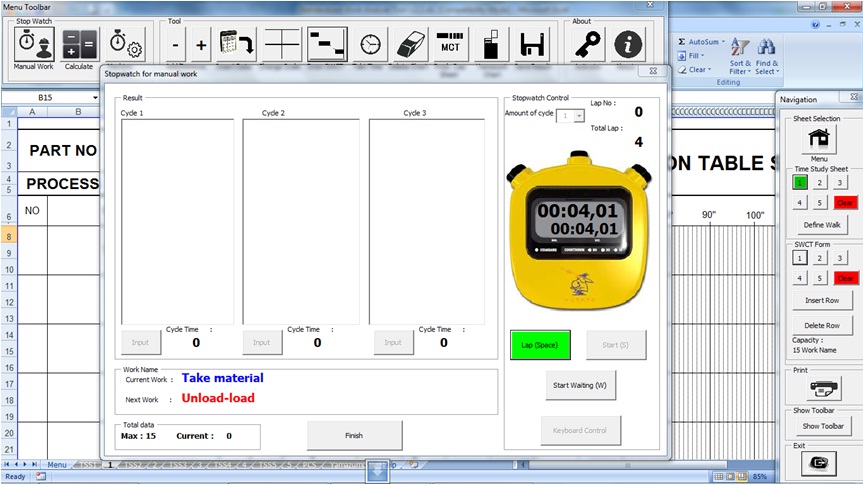
– Stopwatch function, observe time directly based on work name
– Detect waiting and draw it
– Draw Takt Time line
– Save as the result as new book (non macro file)
– Easy to use
– Draw Yamazumi Chart
– Calculate Production Capacity Sheet
– You can change Header according Your Template
Standardized Work Analyze Tool system requirements:
– Microsoft Excel Office 2003 (Recommended)
– Microsoft Excel Office 2007 (sometimes when printing,the line is out from original screen)
– Microsoft Excel Office 2010 (Recommended)
– Microsoft Excel Office 2013 (Recommended)
Download it at http://lean-tool.com/reg_swat.php?id=swat Continue Reading